DISKO
User Handbook
What is DISKO?
DISKO is an AI product partner for PMs. You talk through ideas, make decisions, weigh tradeoffs — and DISKO turns that thinking into specs, prototypes, research, and competitive analysis. No templates to fill out. No forms to configure. Just conversations that produce real artifacts.
The core idea is simple: you think, DISKO amplifies. Describe a feature in plain language and get a PRD. Walk through a user flow and get a clickable prototype. Ask about a market and get a structured research report. Every skill in DISKO is designed to eliminate the grunt work between having an insight and acting on it.
What makes DISKO different is DNA — your product's persistent memory. Every conversation enriches a knowledge graph of your decisions, features, and terminology. DISKO remembers that you chose event-driven architecture over polling, that "workspace" means something specific in your product, that the billing feature depends on the permissions overhaul shipping next quarter. Your 100th conversation with DISKO is dramatically better than your first, because DISKO knows your product the way a great colleague would.
DISKO is built for PMs managing feature portfolios at mid-size companies, founders building product with small teams, and anyone who needs to move from idea to spec to prototype without the overhead. If your bottleneck is documentation, alignment artifacts, or just getting what's in your head into a format others can act on — this is your tool.
Features at a Glance
Think through features with an AI partner that asks the right questions and pressure-tests your reasoning.
Generate PRDs, user stories, and acceptance criteria directly from your descriptions and conversations.
Get interactive HTML prototypes in seconds. Iterate with feedback until the flow feels right.
Paste a screenshot, photo of a whiteboard, or a Figma URL — DISKO matches the visual language and generates a prototype that fits.
Persistent product knowledge that compounds over time — decisions, features, and terminology remembered across every conversation.
Query your entire project in natural language. Surface due dates, spec contradictions, open decisions, anything.
Web-powered research reports on market landscape, trends, and opportunities — structured and ready to share.
Profile competitors, compare feature sets, and find positioning gaps with sourced, structured output.
Track every spec change with AI-generated summaries. Get alerts when specs go stale or conflict with recent decisions.
Copy with rich formatting to Notion or Google Docs, export as PDF or Word, or present specs as slides — all from one button.
Kanban board with Plan, Build, and Ready columns. Bulk operations, due dates, sorting, and filtering built in.
Watch prototypes build in real-time, see specs stream paragraph by paragraph, and track what DISKO is doing with live status indicators.
Connect your codebase and design tokens. Prototypes and specs stay grounded in what your team actually ships.
Getting Started
Create Your Account
Sign up at getdisko.io with your email or Google account. You'll be guided through an onboarding flow that sets up your project context, connects your tools, and synthesizes a product knowledge base. Once onboarding is complete, you're ready to create your first project.
The Onboarding Wizard
DISKO walks you through five steps to set up your project. It takes about three minutes.
| Step | What You Do | Why It Matters |
|---|---|---|
| 1. Project Name | Name your project and pick an icon | Sets your display ID prefix (e.g., PROJ-1) |
| 2. Product Brief | Describe your product in plain language | This is the foundation DISKO builds on |
| 3. Connect Tools | Add your GitHub repo, product URL, or docs URL (all optional) | Gives DISKO real context about what you're building |
| 4. Choose Spec Style | Pick Detailed, Balanced, or Lean | Controls how thorough generated specs are |
| 5. Review Knowledge | Review the AI-synthesized product knowledge doc | Confirm DISKO understood your product correctly |
What Happens During Synthesis
When you finish the wizard, DISKO runs a synthesis pipeline behind the scenes. If you provided URLs, it scrapes your product and documentation pages. If you connected GitHub, it analyzes your repo structure. It combines all of this with your product brief to build a structured knowledge document — your project's starting brain.
This process also seeds your project's DNA: decisions, features, and terminology are automatically extracted from everything you provided. You don't need to do anything manually.
After Onboarding
You land on an empty board with three columns: Plan, Build, and Ready. Your knowledge is loaded. You're ready to create your first task.
Creating a Card
Click New in the Plan column header. You'll see a simple form:
- Title (required) — what is this task about
- Description (optional) — any additional context
- Priority — High, Medium, or Low
Submit with Cmd/Ctrl+Enter, or skip straight to the chat view. Your card gets a display ID (e.g., PROJ-1) and opens in the detail view where you can start working with DISKO's skills immediately.
You don't need a perfect description upfront. Create the card with just a title, then use Diskuss to think through it with DISKO. The description gets refined as you talk.
How Knowledge Works
What is DISKO DNA?
DNA is a persistent product knowledge graph that lives alongside your project. It stores three types of knowledge:
| Type | What It Captures | Example |
|---|---|---|
| Decisions | Choices made during conversations | "Use JWT for auth instead of session cookies" |
| Features | User-facing capabilities being tracked | "Compliance export for enterprise customers" |
| Terminology | Project-specific terms and definitions | "Workspace = a team's isolated environment" |
How DNA Is Generated
DNA accumulates from three sources:
- During onboarding — seeded from the synthesis of your product brief, URLs, and repo
- During spec generation — the enrichment pipeline extracts decisions and features from your conversations automatically
- Manually — use Quick Add on the Knowledge page to capture something DISKO didn't pick up
Why It Matters
DNA compounds over time. The more you use DISKO, the better it understands your product. Generated specs reference prior decisions. Prototypes respect your terminology. When a new team member joins, the knowledge is already there. It's institutional memory that never forgets and never goes on leave.
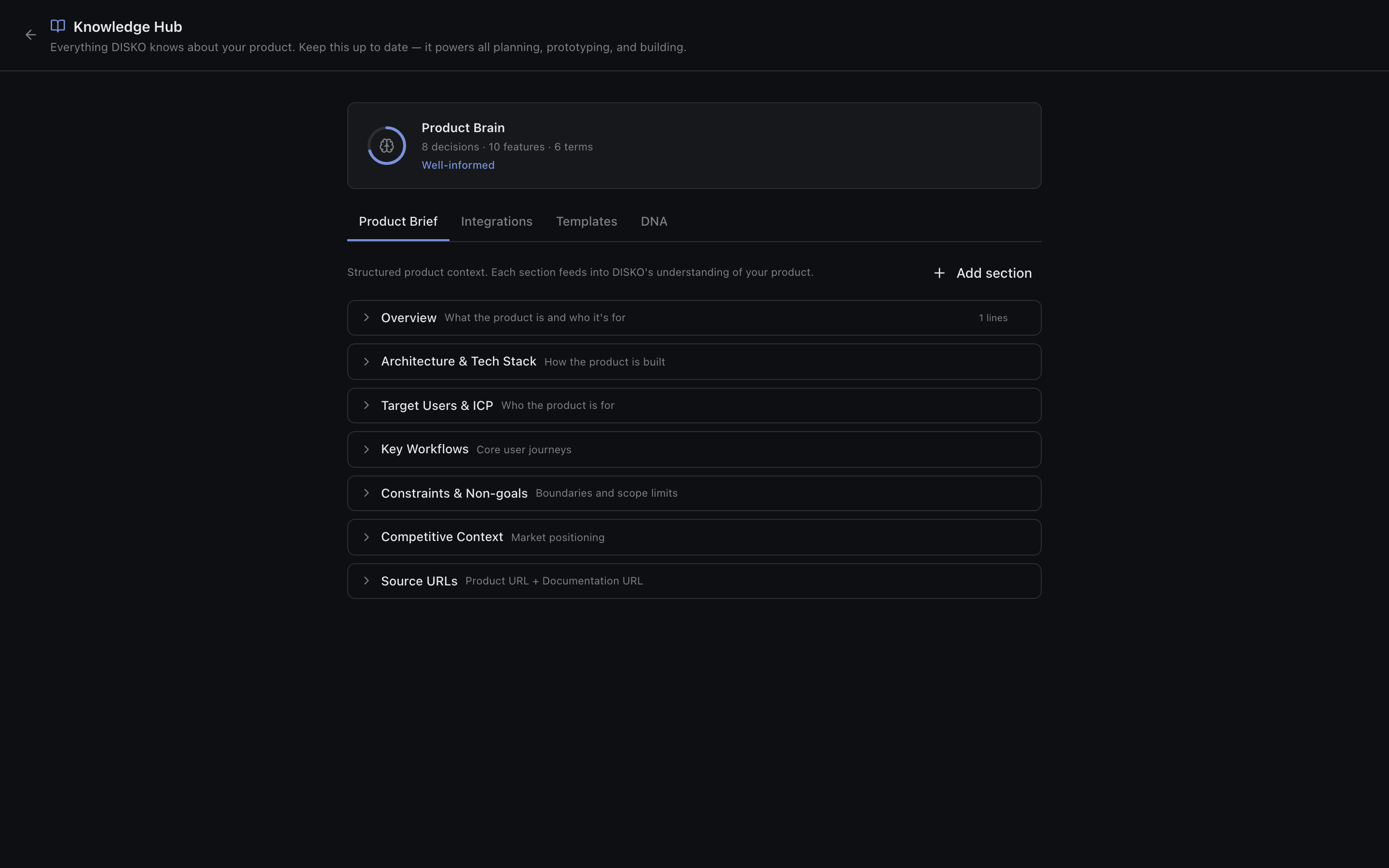
The Knowledge Page
Access it from the sidebar. It has four tabs:
- Product Brief — your product description, editable anytime
- Integrations — connected GitHub repos and Figma accounts
- Templates — spec style preferences, example briefs, tone of voice settings
- DNA — view, search, and delete all decisions, features, and terminology
The Brain Health Ring on this page shows how well-documented your project is — a visual indicator of knowledge coverage. Quick Add lets you manually add any decision, feature, or term right from this page.
The Board — Columns and Task Lifecycle
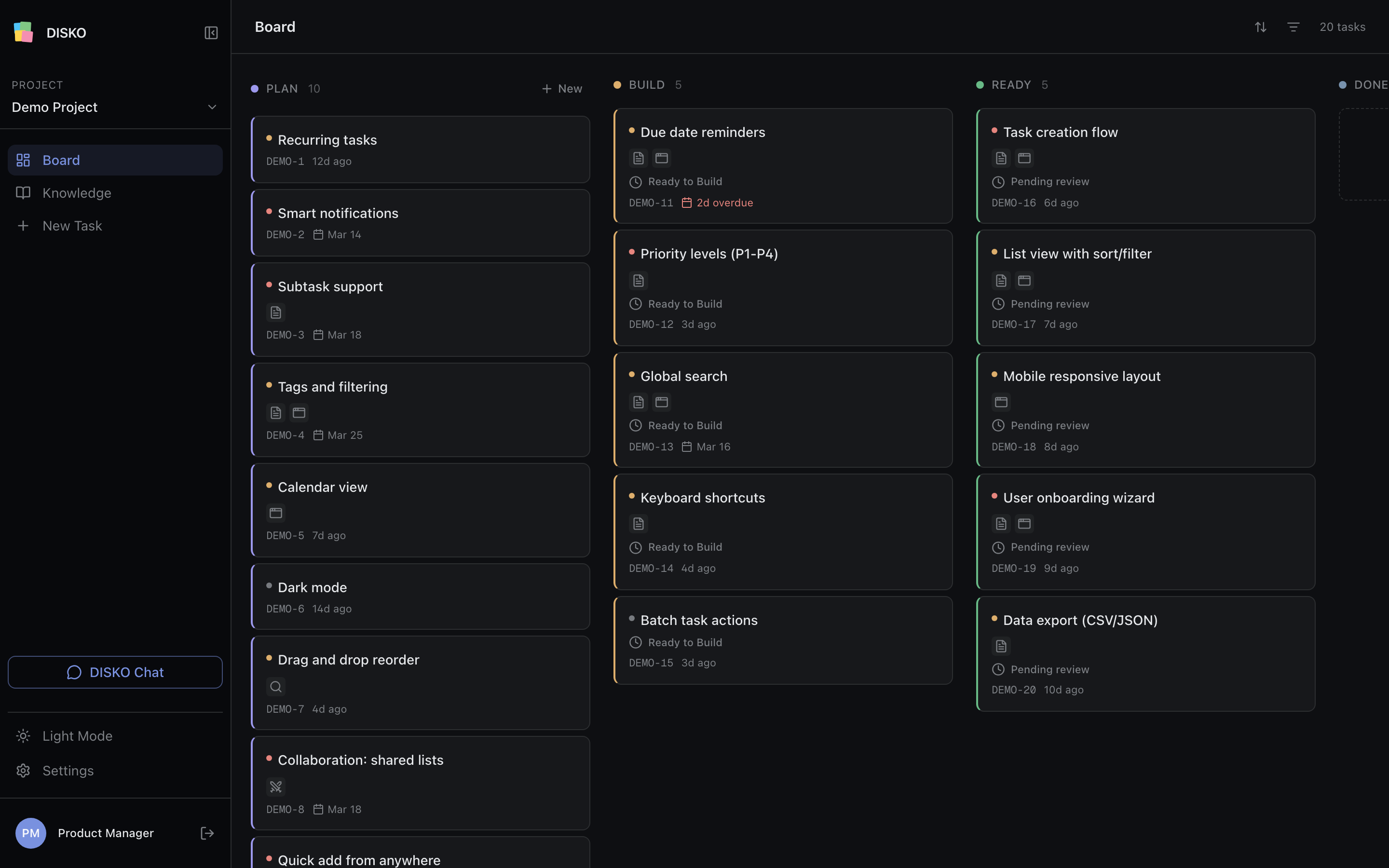
Three Columns
| Column | Purpose | Color |
|---|---|---|
| Plan | Thinking, speccing, prototyping. Most of your work happens here. | Purple |
| Build | Code generation and review (coming soon) | Amber |
| Ready | Shipped and complete | Green |
Moving Tasks
Drag and drop cards between columns. There are guardrails:
- Plan to Build requires a prototype
- Build to Ready requires a PR
- No backward movement from Ready
Due Dates
Set due dates from the task detail header or through bulk operations. They're color-coded so you can scan the board at a glance: red for overdue, orange for due today or tomorrow, gray for future dates.
Sort and Filter
Sort by created date, due date, or priority. Filter by all tasks, overdue, due this week, or has due date. Your sort and filter preferences are saved per project and persist across sessions.
Bulk Operations
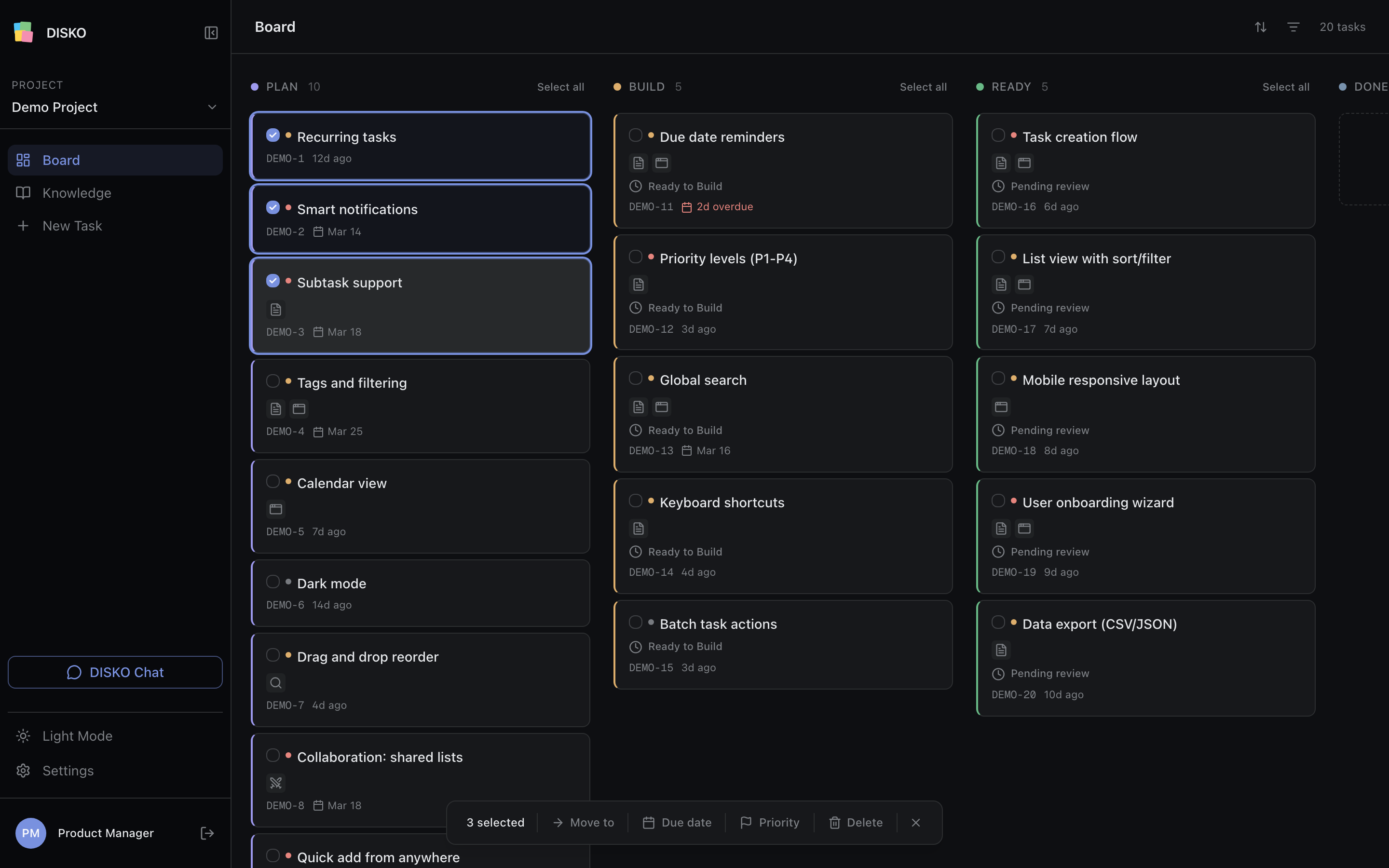
Cmd/Ctrl+Click to select multiple tasks. A floating action bar appears with options to move to a column, set due date, set priority, or delete. Each column has a "Select all" option. Press Esc to exit selection mode.
Inside a Card — All Features
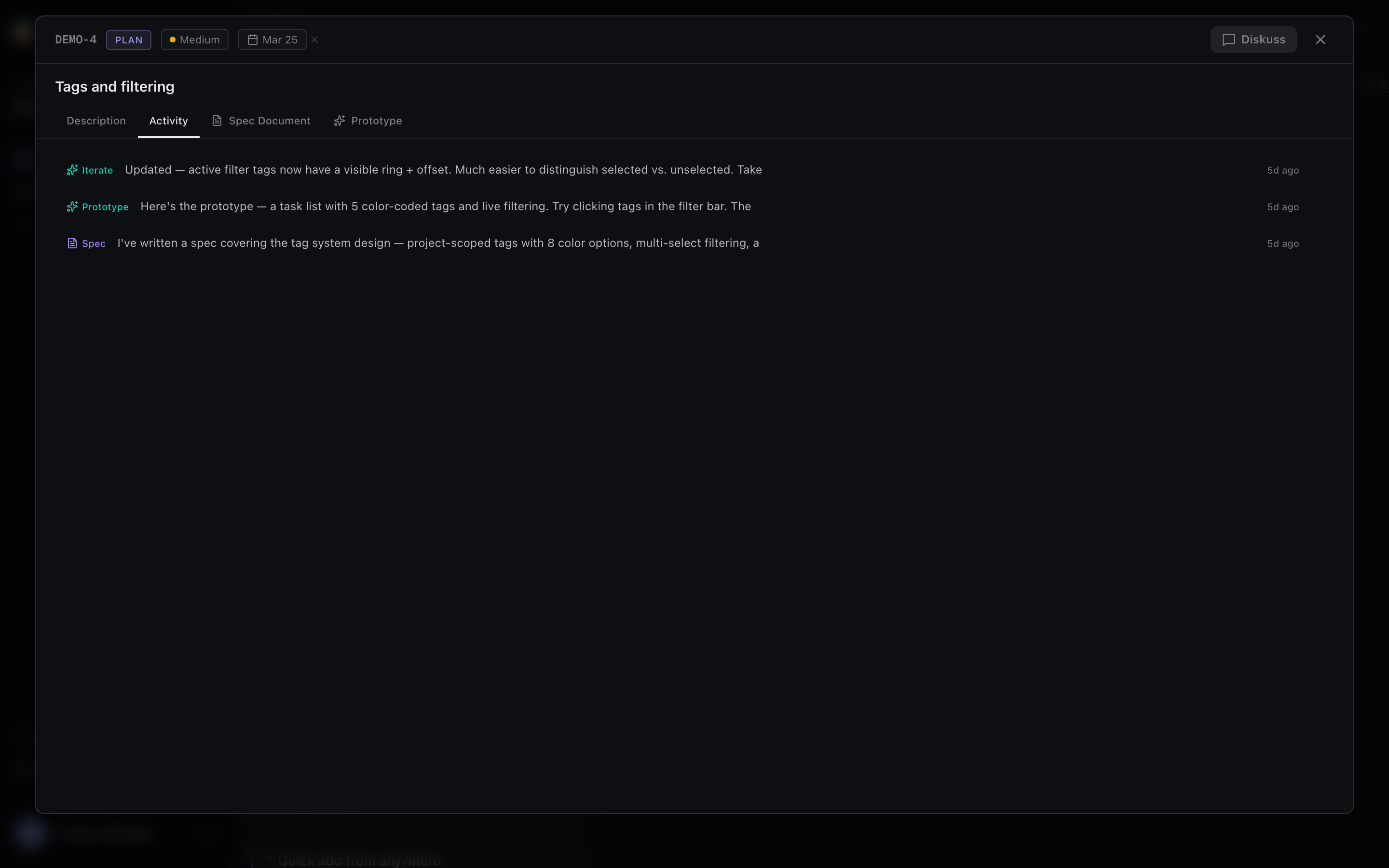
When you open a card, here's what you're looking at:
Header
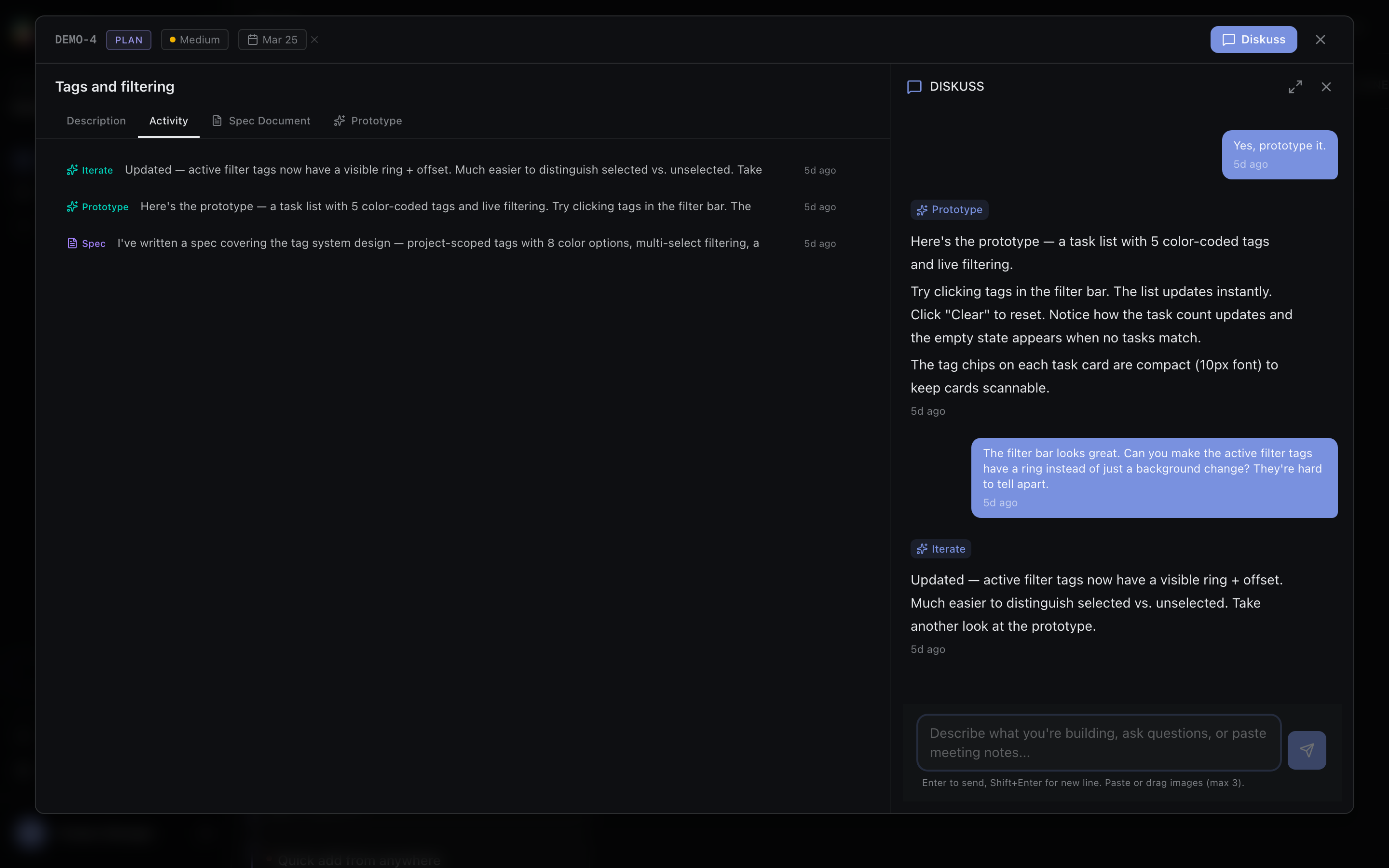
Display ID, column badge, priority indicator (click to cycle through High/Medium/Low), due date picker, and the Diskuss button to start a conversation.
Description
Editable title and description that auto-saves as you type.
Attachments
Add images by pasting or dragging them in. Add links for external references.
Action Toolbar
Skill buttons for Generate Spec, Prototype, Research, and Competition. These are your one-click actions.
Tabs
- Activity — timeline of all skill executions for this card, newest first
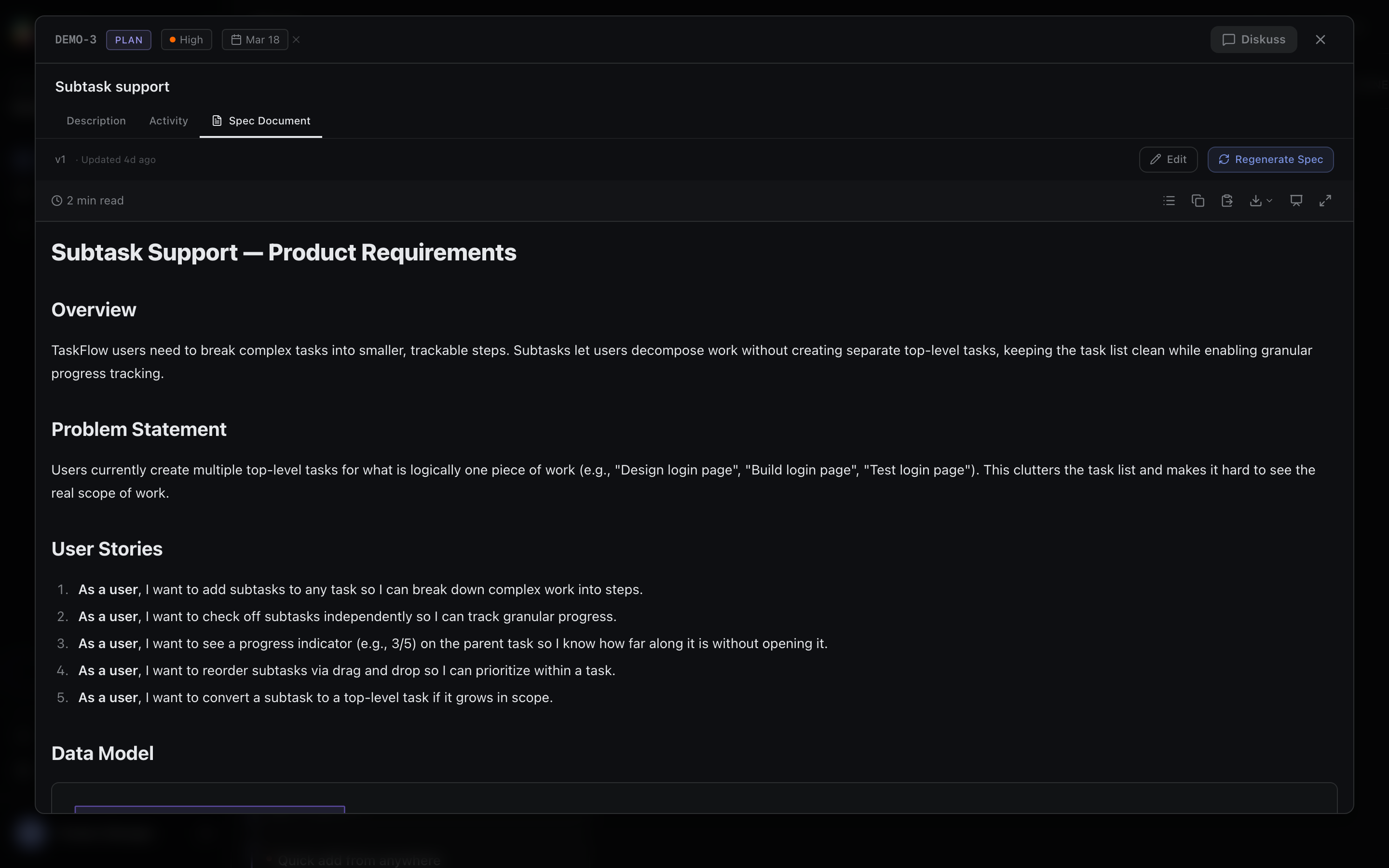
- Spec Document — your generated PRD or user stories with version history, fullscreen view, and copy-as-markdown
- Prototype — live HTML preview with fullscreen mode and an iterate option
Skill Panel
When you click a toolbar button or use Diskuss, a focused chat panel slides in from the right side of the card. This is where you have conversations scoped to this specific task.
DISKO Skills
Skills are the core capabilities DISKO brings to each task. There are seven.
Enrich (Diskuss)
Your thinking partner. Free-form conversation in the Plan column where you clarify features, explore edge cases, and refine your description. Click Diskuss or just type in the Plan column chat. Output: a refined, updated task description.
Generate Spec
Creates a formal specification — PRD, user stories, acceptance criteria. Respects your chosen spec style (Lean, Balanced, or Detailed). Click Generate Spec or say "write the spec." Output: a formatted spec document in the Spec Document tab.
Specs include Mermaid diagrams — architecture diagrams, flow charts, and sequence diagrams rendered visually inline. Version history tracks every edit with AI-generated change summaries. Spec diffs show exactly what changed between versions.
Export specs in multiple formats: rich clipboard copy (paste formatted text directly into Notion, Google Docs, or Confluence), PDF with page numbers, Word (.docx) with full formatting, or presentation mode that splits the spec into slides.
Prototype
Generates a clickable HTML prototype from your description. Self-contained HTML with Tailwind CSS, dark theme, responsive. Available in the Plan column only. Click Prototype or describe a UI you want to see. Output: an interactive HTML preview in the Prototype tab.
DISKO can prototype from multiple inputs:
- Text description — describe the feature in plain language
- Screenshot — paste a screenshot of your existing product or a competitor's UI, and DISKO matches the visual language
- Whiteboard sketch — take a photo of a rough sketch, drop it in, and DISKO uses it as layout guidance
- Figma URL — paste a Figma link and DISKO extracts design tokens to match your design system
Preview in Desktop, Tablet, or Mobile device frames. Toggle between preview-only, split view (code + preview), or code-only. Watch the prototype build in real-time with live streaming.
Iterate
Modifies an existing prototype based on your feedback. "Change the button color to blue," "add an error state," "show the mobile view." Triggered automatically when you give feedback on an existing prototype — you don't need to click anything special. Output: an updated HTML preview.
Review Prototype
Critical review of your prototype for UX gaps, accessibility issues, and missing states (loading, error, empty). Say "what's missing" or "review this." Output: structured findings categorized as Critical, Important, or Suggestions.
Research
Market research with web search. Produces a structured report with Market Overview, Key Findings, Trends, and Opportunities. Click Research or say "market research." Uses web search when available, falls back to AI knowledge when it's not. Output: a research report with sources.
Competition
Competitive analysis. Profiles competitors, compares features, and identifies positioning gaps. Click Competition or say "competitor analysis." Output: a competitive landscape report.
Architect
Analyzes technical feasibility against your connected codebase. When you've connected GitHub, DISKO can assess whether a feature is architecturally sound, identify integration points, and flag potential conflicts. Say "is this feasible?" or "check the architecture." Output: a structured feasibility assessment with module mapping and recommendations.
How Skills Are Triggered
Skills activate three ways:
- Toolbar buttons — click directly from the Action Toolbar
- Keywords — DISKO's router detects intent from your message (e.g., "write the spec" routes to the Spec skill)
- Context — if a prototype already exists and you give feedback, DISKO automatically uses Iterate instead of creating a new prototype
- Clarification — if your request is ambiguous, DISKO asks 1-3 clarifying questions before acting, rather than guessing wrong
You don't need to remember which skill to use. Just describe what you want in the chat. DISKO routes to the right skill based on what you say and what already exists on the card.
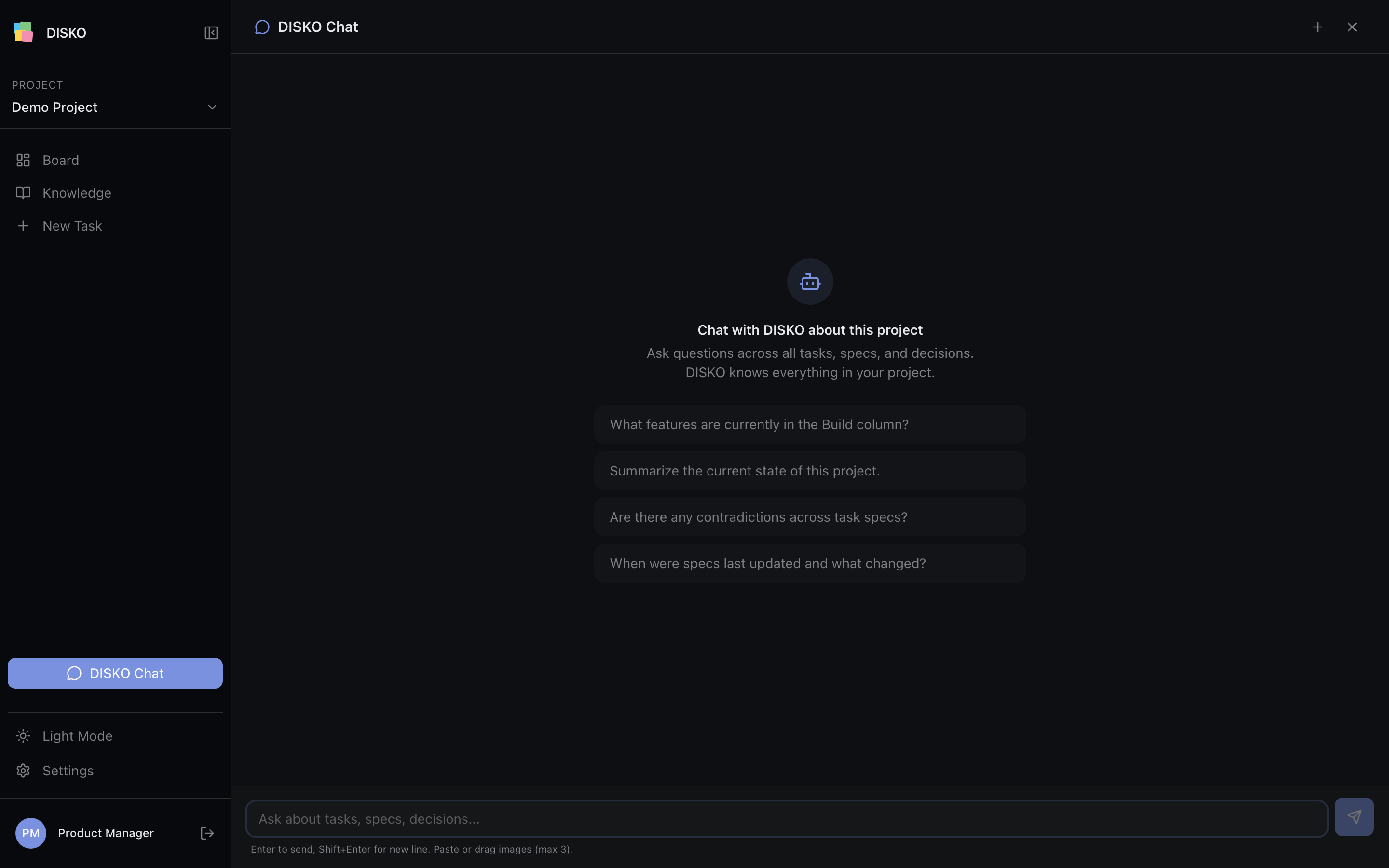
DISKO Chat vs Ask DISKO
These are two different conversation contexts. Knowing which to use saves time.
| DISKO Chat (Diskuss) | Ask DISKO (Project Chat) | |
|---|---|---|
| Scope | Single task | Entire project |
| Where | Side panel inside a card | Full page from the sidebar |
| Use for | Refining this feature, generating specs, iterating prototypes | Questions across all tasks, project summaries, finding contradictions |
Ask DISKO examples:
- "What features are in the Build column?"
- "Send me what tasks are due this week"
- "Are there any contradictions across task specs?"
- "Summarize the current state of this project"
Ask DISKO references tasks by display ID (e.g., DISKO-42) — click any referenced ID to jump to that task.
Using DISKO Efficiently — Real Workflows
Get a Status Summary Without Opening Every Card
Use Ask DISKO (project chat). Type "Send me what tasks are due this week." It knows all your tasks, due dates, and statuses. You get a summary in seconds.
Coming Back After a Meeting with Updates
Open the relevant card's chat. Type something like: "After the meeting with engineering: we decided to drop the batch import feature and prioritize the single-record API instead." DISKO updates the description and spec accordingly, maintaining provenance of what changed and why.
Sharing Prototypes and Specs
Open any card. The Prototype tab shows a live preview you can fullscreen and share. The Spec Document tab has your PRD — click Copy as Markdown to paste it into Slack, Notion, or an email.
Connecting GitHub
Go to Settings (gear icon in sidebar) → Project tab → Connect GitHub. Complete the OAuth flow and select your repo. Once connected, DISKO can analyze your codebase architecture to inform specs and implementation plans.
Connecting Figma
Settings → Project tab → Connect Figma. Once connected, paste any Figma URL into a task chat. DISKO extracts design tokens (colors, typography, spacing) and generates prototypes that match your design system.
Checking Past Decisions
Go to the Knowledge page → DNA tab. Search for any topic. All decisions are categorized (Technical, Product, Design, Scope) and show the rationale plus alternatives that were considered.
Checking Spec History
Open a card → Spec Document tab → click the History icon. You'll see all versions with timestamps. Click any version to view it. AI-generated change summaries tell you exactly what changed between versions.
Knowing if a Spec Is Stale
When your task description changes after a spec was generated, DISKO shows an alert: "Task description changed since spec was generated" with a diff of what's different. Click Regenerate Spec to update.
After any significant conversation that changes the task direction, check the Spec Document tab for the stale spec alert. One click to regenerate keeps everything in sync.
Checking Prototype-Spec Alignment
Each artifact shows a version number (v1, v2, etc.) and a timestamp. If your spec is on v3 but the prototype was generated from v1, the prototype may be outdated. Regenerate the prototype after updating the spec to keep them aligned.
Integrations
GitHub
Connect via Settings → OAuth. Select your repo. Two levels of analysis are available:
- Sync — pulls repo metadata
- Deep Scan — full architecture analysis producing a health score, module breakdown, and separation of concerns report
Figma
Connect via Settings → OAuth. Paste Figma URLs into any task chat. DISKO extracts design tokens — colors, typography, spacing — and uses them to generate prototypes that match your existing design system.
Coming Soon
Jira and Linear Integration Coming Soon
Import tasks from your existing tracker. Two-way sync: read and write to specific tickets, status sync between DISKO and your tracker. Linear first, Jira following.
Build and Architecture Pipeline Coming Soon
DISKO analyzes your codebase, generates an implementation plan, produces production code, creates a PR, and runs an automated code review loop. Coming as a premium feature.
Slack Integration Coming Soon
Get notifications when specs are generated, prototypes are ready, or tasks hit milestones — all delivered to your Slack workspace.
Multi-User Collaboration Coming Soon
Invite teammates to your project. Shared boards with role-based access — owners, editors, and viewers. Built for PM teams, not just solo PMs.